Connecting Claude to the Nue MCP App
Connecting takes about a minute and two pieces of information: a name and a URL. There are no API keys to copy and no JSON to hand-edit — you sign in the way you already sign in to Nue, and Claude then acts as you, with your permissions and your audit trail.
Before you start
- A Nue AI license is enabled on your tenant. Existing tenants don't have it by default — contact your Nue Account Executive. See Configure Nue AI.
- You can sign in to Nue, either through Salesforce or with a Nue email and password.
- Use Claude for the full MCP App experience. Other clients can call the same tools but don't render Nue's cards yet — see Client support below.
Pick your environment
Environment | MCP server URL | Use it for |
|---|---|---|
Sandbox | https://mcp.sandbox.nue.io/mcp | Trying the app, training, and anything you don't want landing on real records |
Production | https://mcp.nue.io/mcp | Live quoting, approvals, and documents |
Start in Sandbox. The app creates real opportunities, quotes, and approval requests. Sandbox lets you click through the whole motion — including the irreversible-looking parts — without touching production data.
Add the connector
- In Claude, open Settings → Connectors.
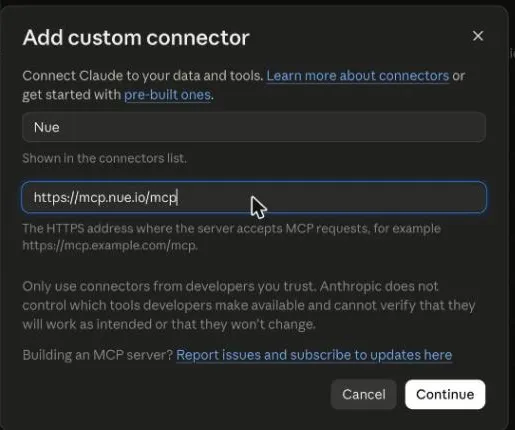
- Click Add (top right), then Add custom connector.
- Fill in the two fields:
- Name — what you'll see in the connector list and on every card. Nue for production; something like Nue Sandbox if you're connecting the sandbox, so the two are never confused.
- MCP server URL — the URL for your environment from the table above.
- Click Continue.
Sign in
The first time Claude needs a Nue tool, your browser opens Nue's Authorize MCP access screen. Choose how you want to sign in:
Sign-in option | When to use it | What it honors |
|---|---|---|
Salesforce — Production (recommended) | Your everyday Salesforce-connected tenant | Your org's SSO, MFA, and record-level sharing |
Salesforce — Sandbox | QA or staging Salesforce orgs | Same SSO/MFA, against your sandbox org |
Nue email & password | Users with direct Nue app access — admins, RevOps, and similar roles | Your Nue login and session |
Complete the login, including any MFA your organization requires. When you see "You're connected. You can close this tab," go back to Claude — the action retries on its own.
You only do this once per client and device. Sessions are short-lived by design; when yours expires Claude shows a Reconnect prompt, and signing in again is usually faster because your Salesforce session is often still active.
For the full picture of the sign-in model — why OAuth rather than a shared key, and the static-key alternative for unattended automation — see Connecting to Nue MCP.
Check that it worked
Open a new chat and ask for something small and read-only:
Two things should happen:
- Claude asks permission to run a Nue tool, naming the tool and showing the request payload.
- After you allow it, the result comes back as a card — a table of customers with Select buttons — not as a paragraph of prose or a block of JSON.
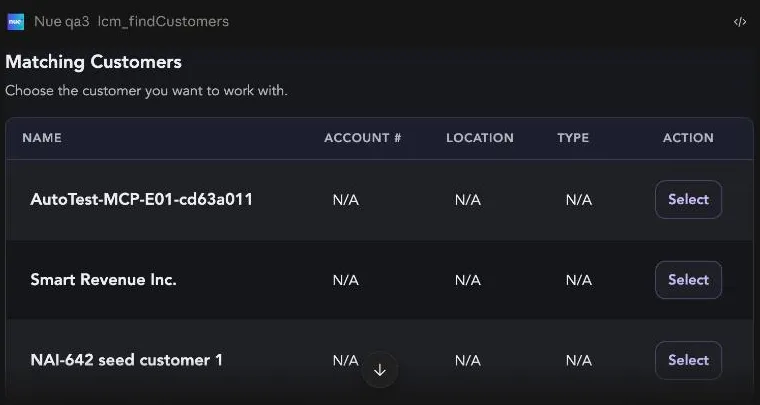
If you get a correct answer in plain prose but no card, the connection is fine and the tools are working — your client just doesn't render MCP Apps. See Client support.
What you'll see depends on your role
One connection gives you the whole Nue MCP Gateway — but not all two hundred–plus tools it federates. Nue scopes the set to the roles of the signed-in user through Tool Visibility, so a Sales Representative's assistant offers quoting, a Finance Operations Manager's offers billing, and neither has to configure anything.
This is worth knowing before you go looking for a missing feature:
- A tool your role can't see is a tool the app cannot offer a card for. It behaves as though it does not exist.
- Visibility is derived from API permissions. Administrators can hide tools from a role, but nothing can force a tool visible for a role that lacks the underlying grant — that's fixed on the Roles page, not in MCP settings.
- Approvals are the notable gap. Approval Management is licensed and permissioned separately, and its permissions are granted to no role as shipped. If you plan to run approvals in the app, have an administrator grant them first.
Set tool loading to match how you work
Claude's Settings → Capabilities → Tool access mode controls how connector tools are loaded:
- Load tools when needed (default, recommended) — Claude searches the Nue tool catalog and pulls in what the task requires. You'll see a short "searching for the right tool" step early in a conversation, and a one-time approval for the tool-search helper. This keeps long sessions fast.
- Load all tools upfront — every Nue tool is available immediately, at the cost of a larger context.
Either mode works. If a flow ever stalls looking for a tool that should exist, switching to load-all-upfront for that conversation is a quick way to rule out discovery as the cause.
Client support
Client | Tools | Cards | Status |
|---|---|---|---|
Claude (web, desktop) | ✅ | ✅ | Fully supported |
ChatGPT | ✅ | 🚧 | Under testing. Add Nue the same way — Settings → Connectors → Add custom connector with the same URL — and the tools work. Nue's cards don't render yet; results come back as text. Support is in testing and will be available soon. |
Claude Code | ✅ | ➖ | Terminal client — tools only. Add with claude mcp add --transport http nue https://mcp.nue.io/mcp |
Codex, Cursor, other MCP clients | ✅ | ➖ | Tools only; structured results instead of cards |
Troubleshooting
What you see | What it means | What to do |
|---|---|---|
No prompt to sign in, and Nue tools fail | The connector was added but never authorized | Run any Nue request; the authorize screen opens on the first call |
Reconnect to Nue | Your session expired | Click it and sign in again |
Results arrive as prose or JSON, never as cards | The client doesn't support MCP Apps | Use Claude for the card experience — see Client support |
A tool returns "not found" for a record you can see in Nue | You're connected to the other environment | Check which connector the card names — Nue or Nue Sandbox |
Fewer tools than you expect | Your Nue role scopes what's visible | Expected — see What you'll see depends on your role |
The assistant says an approvals tool doesn't exist | Approval Management permissions aren't granted to your role | They ship granted to no role — an administrator grants them on the Roles page |
Related
- Nue MCP App Overview — what the app is and how its guardrails work.
- Creating a Quote in the Nue MCP App — the first thing to try once you're connected.
- Building a Skill for the Nue MCP App — turn a repeatable motion into one sentence.
- Connecting to Nue MCP — OAuth in depth, plus static API keys for unattended use.