Tool Visibility
Tool Visibility
A connected assistant can see every tool the Nue MCP Gateway federates — well over two hundred of them across lifecycle, pricing, billing, admin, commerce, and docs. Most people need a fraction of that. Tool Visibility lets an administrator decide which tools each role sees, so a billing analyst's assistant offers billing work and a sales engineer's offers quoting, without either being handed the whole surface area.
Tool visibility is governed entirely by the roles of the signed-in user. There is no separate MCP permission model to maintain and no API for changing it — an administrator manages it from the Nue UI, and what any given assistant can see follows from the roles its user holds.
This is a discovery control, not a security boundary. Hiding a tool removes it from what the assistant can find and call through the gateway. It does not change what the underlying APIs allow — every call the gateway dispatches is still authorized by the Nue API against the caller's own permissions.
How visibility is decided
Visibility is derived from the permissions a role already has. Every MCP tool declares the API resources it uses, and a tool is visible to a role only when that role's existing API grants cover all of them. Nothing about tool visibility grants API access.
On top of that derivation, an administrator can hide specific tools from specific roles. Overrides only ever subtract:
State | Meaning | Can an administrator change it? |
|---|---|---|
Visible | The role has every API permission the tool needs, and no one has hidden it. | Yes — it can be hidden. |
Hidden | The role has the permissions, but an administrator has hidden the tool from this role. | Yes — it can be made visible again. |
Not permitted | The role is missing at least one API permission the tool requires. | No. Grant the permissions on the Roles page first. |
Why you cannot force a tool to be visible
There is no "always show" override, by design. Showing a tool the role has no API permission for would produce an assistant that offers an action and then fails on it, because the API layer would reject the underlying call. Fixing that means granting the permission on the Roles page — at which point the tool becomes visible on its own.
Managing visibility in Nue
Tool Visibility is managed per server, from the MCP Servers settings page.
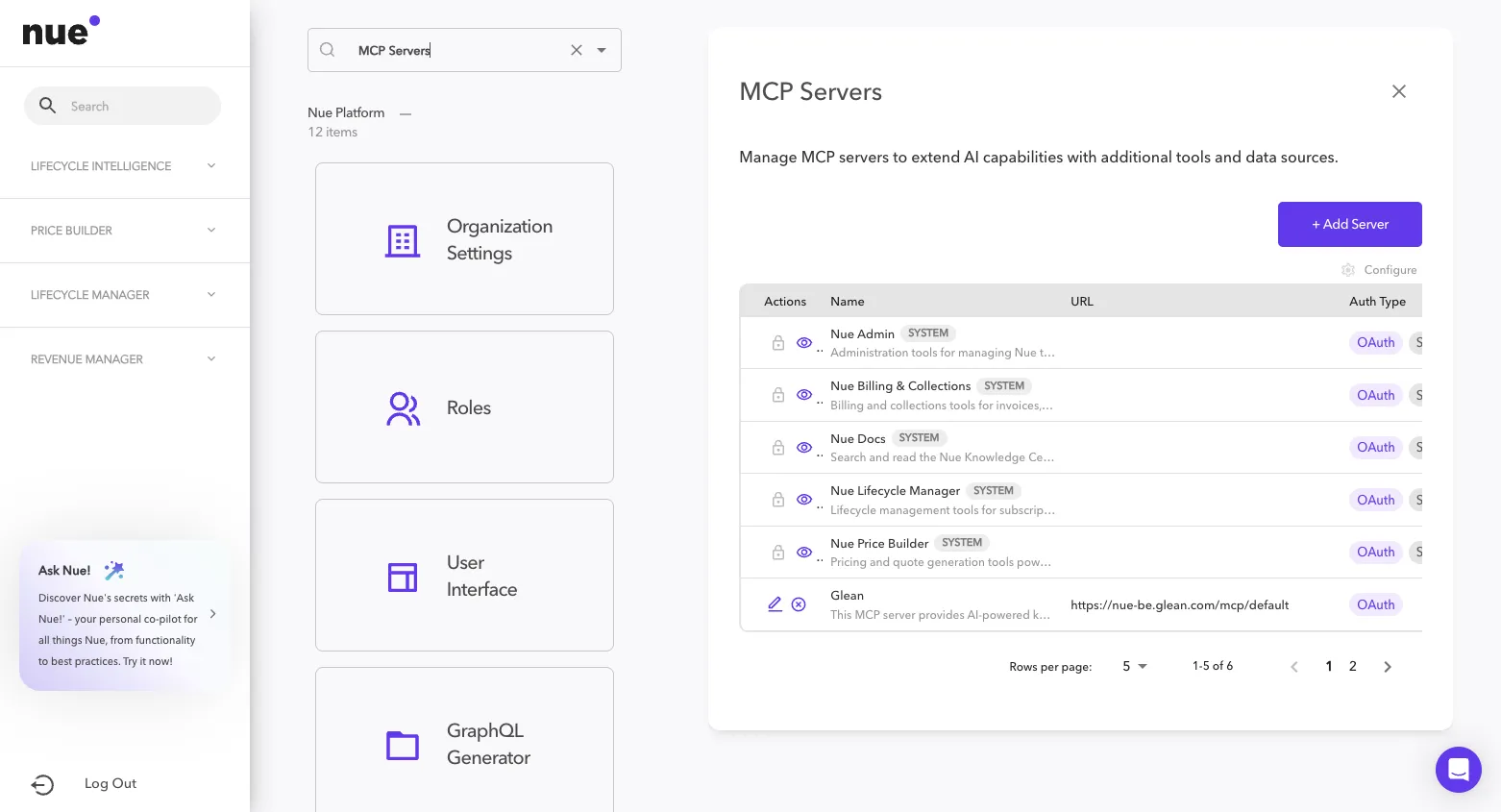
- Go to Settings → MCP Servers.
- On the row for the server you want to manage, choose the Tool Visibility action.
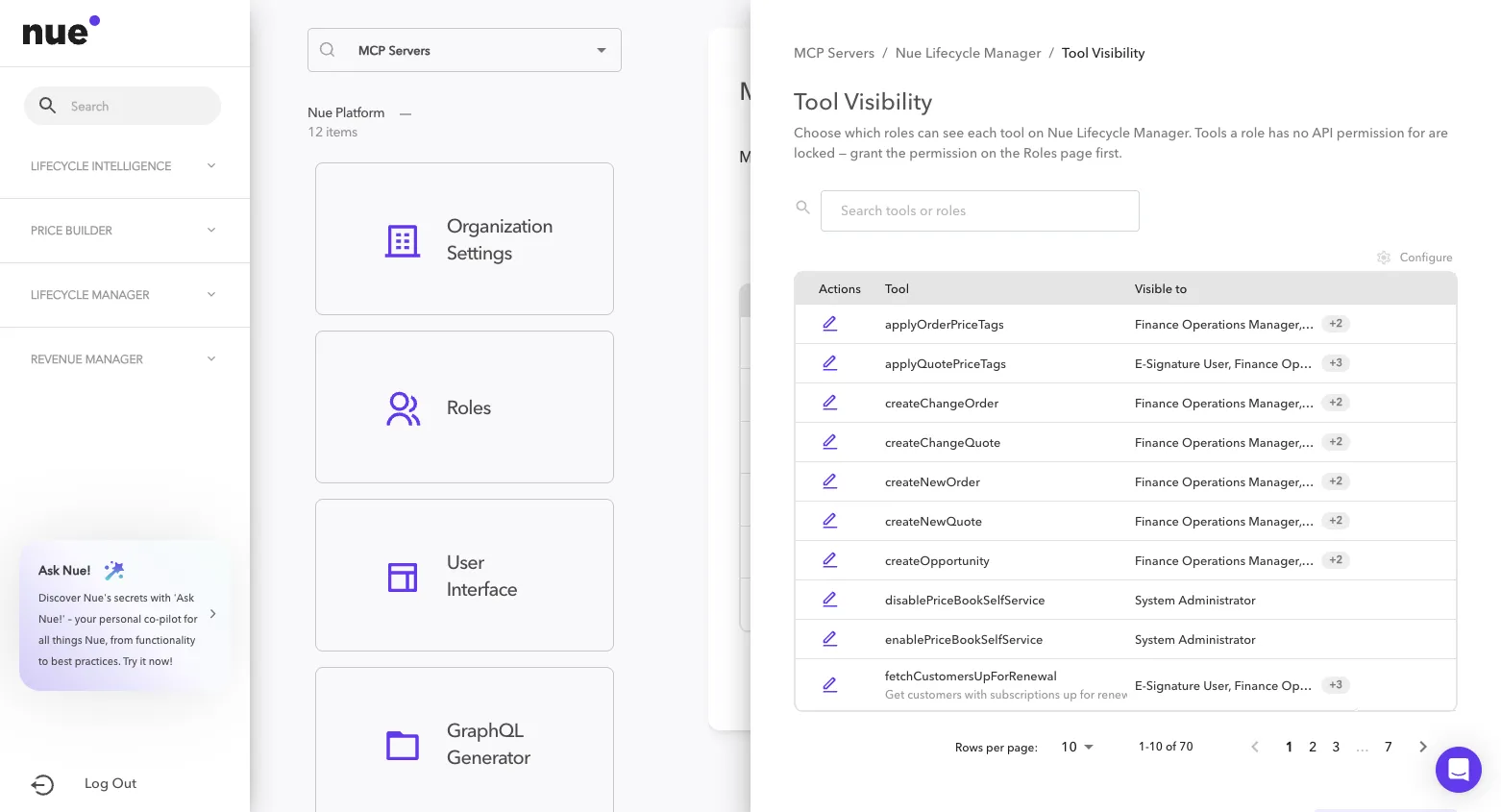
- The drawer lists that server's tools. Select a tool to see its roles, and toggle a role between visible and hidden.
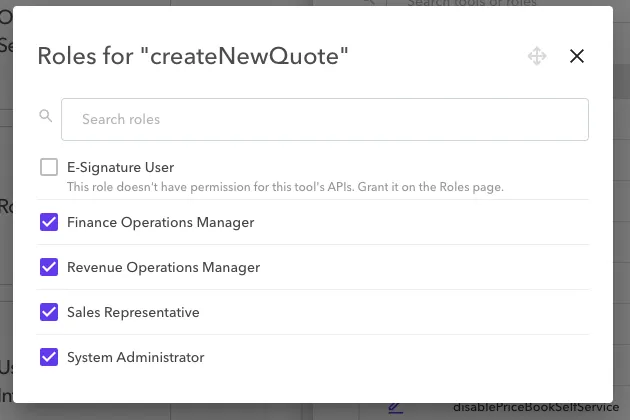
- Roles missing a required API permission are shown locked, with an explanation — those are changed on the Roles page, not here.
In the role dialog above, four roles can see createNewQuote and can be toggled. E-Signature User is locked, with the reason given inline — that role is missing an API permission the tool needs, so it is changed on the Roles page rather than here.
Managing visibility requires the Manage MCP Tool Visibility permission. Administrators without it can still use the MCP Servers page but will not see the action.
What the default roles can see
Because visibility follows API permissions, each of the standard roles arrives at a working tool set without anyone configuring one. The shape of each is summarised below.
Role | What its assistant can do |
|---|---|
E-Signature User | The narrowest set, and almost entirely read-only. Look up customers, subscriptions, assets and entitlements; read invoices and credit memos; list and read documentation. Its one workflow is signatures — preview a quote for e-signature, send it, and check signature status. |
Sales Representative | The quoting role. Create and change quotes and orders, edit quote lines, apply price tags, generate quote and order documents, and manage opportunities. Reads customers, subscriptions, renewals and product pricing. Sees a small slice of billing — mostly invoice and credit-memo reads — and can inspect pricing plugins without editing them. |
Finance Operations Manager | The billing role. Nearly all of Billing & Collections: invoices, credit and debit memos, payments and payment rules, billing schedules, usage rating, and the CRM sync jobs. Reads customers and subscriptions, sees part of the lifecycle surface, and holds a few tenant settings tools. |
Revenue Operations Manager | The broadest non-admin role. Most of what Finance Operations sees on the billing side, plus deeper reach into the lifecycle and pricing surfaces — quoting, price tags, product publishing, and most of Price Builder, including authoring and testing pricing plugins. |
System Administrator | Everything. All servers, including the tenant configuration, import/export and registry tools that no other role sees. |
Every role also sees all of Nue Docs — searching and reading documentation is available to everyone.
The approvals tools on Nue Lifecycle Manager are the one exception to the table above. Approval Management is licensed and permissioned on its own, and its four permissions — View Approval Processes, View Approvals, Submit Approvals, Act on Approvals — are granted to no role as shipped. System Administrator holds them because it holds every function; for every other role the approvals tools start as Not permitted until an administrator grants the function on the Roles page. See Nue Lifecycle Manager for the tool-to-permission mapping.
This table describes the roles as they ship. Because visibility is derived from API permissions, changing what a role can call on the Roles page changes what its assistant sees — so a customised role may look quite different from the summary above.
What a user experiences
When a tool is hidden from every role a person holds, their assistant behaves as though the tool does not exist:
- it is absent from the tool list the assistant loads when it connects;
- it is not returned by tool search, so the assistant will not propose it; and
- a direct call is refused by the gateway before it reaches the server.
Visibility is resolved when an assistant connects, so a change takes effect in the next session rather than the one already open. Ask the user to reconnect if they need it sooner.
Things worth knowing
- Visibility is per tenant. Hiding a tool in one tenant has no effect in any other, and a role in one tenant cannot be named from another.
- Hiding survives a permission change. If you hide a tool from a role that cannot currently use it, and the role is later granted the missing permissions, the tool stays hidden until you unhide it.
- If visibility cannot be determined, nothing is hidden. Should visibility be briefly unresolvable, assistants keep their full tool list rather than losing access mid-session. Discovery degrades open; authorization does not — the Nue API still checks every call against the user's roles.