Connecting to Nue MCP
Connect Nue to your favorite AI client in one click — no API keys to copy, no JSON to hand-edit. You sign in the way you already sign in to Nue, and the assistant acts as you, with your permissions, your record access, and your security policies.
When you connect a Nue MCP server with OAuth, you authorize your AI client (ChatGPT, Codex, Claude, Claude Code, Cursor, and more) to work in Nue under your own identity. Instead of pasting a shared API key into a config file, you click a button, sign in through your browser, and you're connected. Every quote, order, or pricing action the assistant takes is tied to you — not to an anonymous "MCP" service account.
This is the recommended way to connect to any Nue MCP server.
One connection, all built-in servers. Connecting to the Nue MCP Gateway with OAuth gives you every built-in server in a single sign-in — Nue Lifecycle Manager, Nue Docs, and Nue Price Builder (all on by default). OAuth is best for everyday, interactive use; a static API key is available for unattended connections that shouldn't have to re-authenticate (see Connect with a static API keyConnect with a static API key below).
Before you start
- A Nue AI license is enabled on your tenant. Existing tenants don't have it by default — contact your Nue Account Executive. See Configure Nue AI.
- For the Salesforce sign-in options, your Nue tenant is connected to Salesforce. If it isn't, use the Nue email & password option instead.
- The role tied to your login determines which tools and records the assistant can see and change. You only ever get what you're already allowed to do in Nue.
Why OAuth instead of an API key
With OAuth | With a static API key |
|---|---|
The assistant acts as you — audit logs show your name | Everyone shares one service account; logs say "MCP" |
Your Salesforce sharing, field-level security, MFA, and IP policies apply automatically | Full scope of the key, for everyone who has it |
Short-lived tokens, refreshed automatically | Long-lived secret you must rotate by hand |
One-click install in any modern AI client | Copy-paste URLs and secrets into config files |
A static API key is the better fit for unattended connections — background automation, CI jobs, or headless agents — where no one is around to sign in again when an OAuth session expires. See Connect with a static API keyConnect with a static API key below.
Choose how you sign in
When you connect, Nue shows you an Authorize MCP access screen. Pick how you want to sign in — the assistant then uses that identity for every action it takes in your tenant.
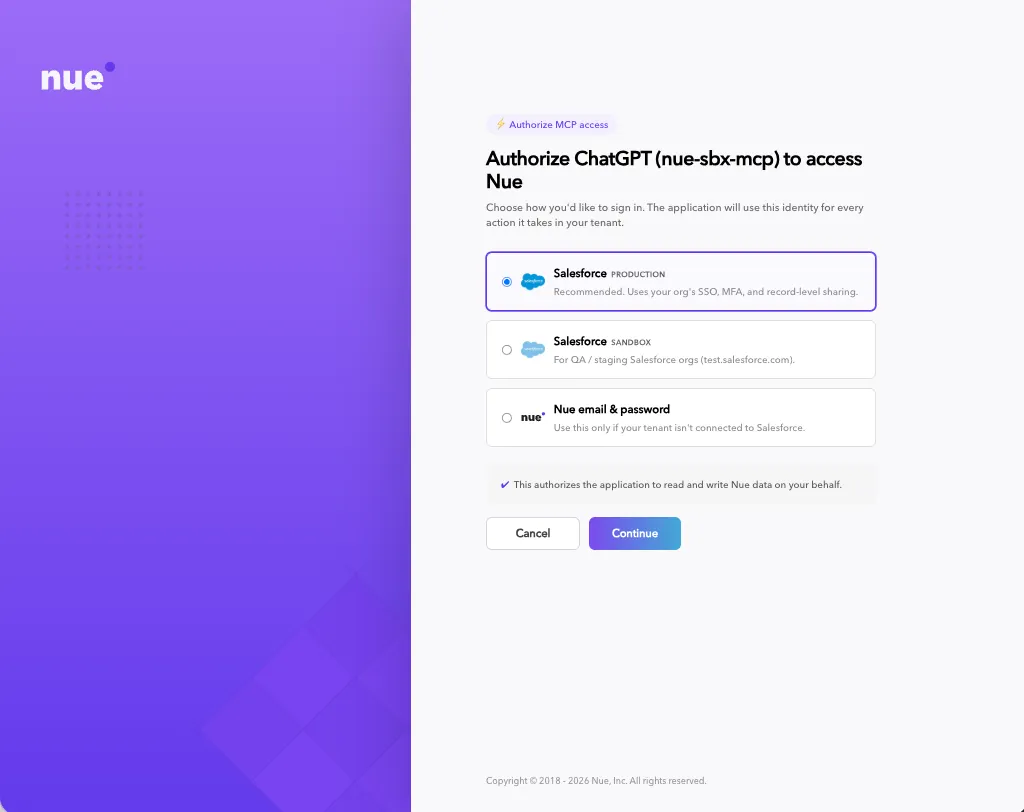
Sign-in option | When to use it | What it honors |
|---|---|---|
Salesforce — Production (recommended) | Your everyday Salesforce-connected tenant | Your org's SSO, MFA, and record-level sharing |
Salesforce — Sandbox | QA or staging Salesforce orgs (test.salesforce.com) | Same SSO/MFA, against your sandbox org |
Nue email & password | A convenient option for users with Nue app access — admins, RevOps, and similar roles | Your Nue login and session |
You only need to do this once per client and device. The assistant reads and writes Nue data on your behalf — exactly within your permissions.
Connect for the first time
The flow is the same in every client. You never edit credentials by hand — the client discovers everything it needs from Nue automatically.
- Add the Nue MCP server to your client (see the per-client steps below).
- Run anything that touches Nue — e.g. "List my customers up for renewal." The first call prompts you to connect.
- Your browser opens the Authorize … to access Nue screen.
- Pick how you sign in (Salesforce Production, Salesforce Sandbox, or Nue email & password) and complete the login — including any MFA your org requires. This all happens in your browser.
- You'll see "You're connected. You can close this tab."
- Back in your client, the action retries automatically and you're working in Nue.
That's it — no keys, no JSON, no URLs to paste into a secrets field.
Use case: one Nue connector, every AI client
Because Nue's MCP servers follow the open MCP authorization standard, the same one-click experience works everywhere — as a custom connector in ChatGPT and Claude, and in coding agents like Codex and Claude Code. Connect once per client; the sign-in screen, your identity, and your scopes are identical no matter which client you use.
A few ways teams use this:
- A RevOps lead in ChatGPT or Claude adds Nue as a custom connector and asks, in plain language, "Which accounts are up for renewal next quarter, and what's the ARR at risk?" — answered live from Nue, under their own access.
- A developer in Codex or Claude Code connects Nue alongside their codebase and has the agent pull live pricing or draft a change quote while building an integration — no test API key sitting in a dotfile.
- A sales engineer switches between ChatGPT on the web and Claude on the desktop — same Nue connection model, same permissions, in both.
ChatGPT & Claude (custom connector)
- Open your client's Settings → Connectors and choose Add custom connector.
- Paste the Nue MCP server URL and click Connect:
- Production — https://mcp.nue.io/mcp
- Sandbox — https://mcp.sandbox.nue.io/mcp
- Authorize in the browser using the sign-in screen above.
Codex
Add the Nue MCP server URL to your Codex MCP configuration (Production https://mcp.nue.io/mcp, Sandbox https://mcp.sandbox.nue.io/mcp). OAuth is supported via:
codex mcp login <server-name>This opens the browser authorize screen; sign in and you're connected.
Claude Code
claude mcp add --transport http nue https://mcp.nue.io/mcp          # Production
claude mcp add --transport http nue https://mcp.sandbox.nue.io/mcp  # Sandbox
Run a Nue tool, and Claude Code opens the browser to Authorize Claude Code to access Nue. Sign in, and you're connected.
Same identity, everywhere. Whichever client you connect from, the assistant acts as the user who signed in — with that user's scopes and audit trail. Connecting in one client doesn't grant access in another; each device authorizes once.
Reconnect when your session expires
Sessions are short-lived by design. When yours expires, your client shows a small "Reconnect to Nue" prompt. Click it and sign in again — it's usually faster the second time, because your Salesforce session is often still active. No reconfiguration needed.
Connect with a static API key (alternative)
For unattended connections that shouldn't have to re-authenticate — background automation, CI jobs, or headless agents — you can connect with a static nue-api-key header instead. Unlike an OAuth session, the key doesn't expire, so the connection keeps working without anyone signing in again.
Keep the trade-off in mind: a static key grants role-based access — whatever its assigned Nue user role is allowed to do — and does not honor Salesforce record-level sharing or field-level security the way an OAuth sign-in does (where the assistant acts as the signed-in user, within that person's exact record access). Provision the key with the least-privilege role for the job.
Nue environment | MCP server endpoint |
|---|---|
Sandbox | https://mcp.sandbox.nue.io/mcp |
Production | https://mcp.nue.io/mcp |
{
  "mcpServers": {
    "nue": {
      "type": "http",
      "url": "https://mcp.nue.io/mcp",
      "headers": {
        "nue-api-key": "YOUR_NUE_API_KEY"
      }
    }
  }
}
For full per-client setup and the Price Builder endpoints, see Customer Lifecycle MCPCustomer Lifecycle MCP and Price Builder MCPPrice Builder MCP.
How your connection stays secure
- You sign in, Nue doesn't store your password. Salesforce MFA and SSO run in your own browser on every fresh authorization.
- Short-lived, per-user tokens are held securely by your client (in the OS keychain) — not in a plain-text config file.
- Your access, your limits. The assistant inherits your Salesforce record-level sharing and field security, and can be scoped narrower than your full Nue role.
- Everything is auditable to you. Tool calls are logged against your identity — so it's always clear who did what, not just "MCP."
Related
- Nue Lifecycle ManagerNue Lifecycle Manager — create opportunities, quotes, and orders, and manage the customer lifecycle (subscriptions, invoices, and credit memos).
- Nue DocsNue Docs — search and read the Knowledge Center and REST API reference.
- Nue Price BuilderNue Price Builder — products, pricing rules, bundles, and pricing plugins.
- External MCP ServersExternal MCP Servers — connect your own analytics, call intelligence, and meeting tools so Nue's agent can reach the rest of your stack.
- Nue MCP Servers OverviewNue MCP Servers Overview — what MCP is, the Nue MCP catalog, and how the servers fit together.