External MCP Servers
Connect external MCP servers — analytics, conversation intelligence, meeting tools, your own custom servers — so Nue's AI agent can reach beyond Nue's own data and bring real context into every quoting conversation.
Nue's built-in MCP servers — Nue Lifecycle Manager and Nue Price Builder — already let agents read subscriptions, build quotes, and apply pricing. Connecting external MCP servers lets the same agents reach into the rest of your stack — your analytics in Sigma, your call summaries in Gong, your meeting notes in Fellow, or any MCP-compliant tool your team already uses — without point-to-point integrations or custom development.
Prerequisites — Licenses and Permissions
- Nue AI license is enabled on your org. Existing tenants do not have it by default — contact your Nue Account Executive to acquire it. See Configure Nue AI.
- Your user role grants the AI → Manage MCP Servers permission (and AI → View MCP Servers to see the list). The System Administrator role is not required — these can be granted on any custom role.
- Bring-your-own AI provider required. External MCP servers can only be configured when the org is on its own AI provider. Set AI Model to Use my own provider in Settings → Nue AI → AI Model with a valid API key for Anthropic, OpenAI, or Gemini. While on Nue's default provider, only system MCP servers are available — the + Add Server action is not shown.
Why extend Nue AI with external MCP servers
- Richer agent context. Pull live ARR trends, renewal risk signals, recent customer call summaries, and stakeholder insights into the quoting conversation — not just what's already in Nue.
- Open and extensible. Any MCP-compliant server can plug in. As the MCP ecosystem grows, Nue grows with it — no waiting for a native integration.
- You stay in control. Admins choose which servers to connect, how each one authenticates, and which AI provider is used. The agent only calls tools from servers you've approved.
Concepts
Concept | What it is |
|---|---|
MCP server | A connector that exposes tools the AI agent can call. Each server has a name, URL, and authentication method |
System MCP server | Nue-managed, always available — Nue Lifecycle Manager and Nue Price Builder. Cannot be edited, deleted, or turned off |
External MCP server | Connected by your admin. Lives outside Nue (e.g. Sigma, Gong, Fellow, or any MCP-compliant server) |
Authentication type | How Nue authenticates to the server: None, OAuth, or Secret Header |
Server status | Connected, Needs auth, or Failed — shown in the sales rep's MCP panel |
For Admins — Connect an external MCP server
This walkthrough uses a Sigma analytics server as the worked example. The flow is the same for any MCP-compliant server — only the URL and authentication details differ.
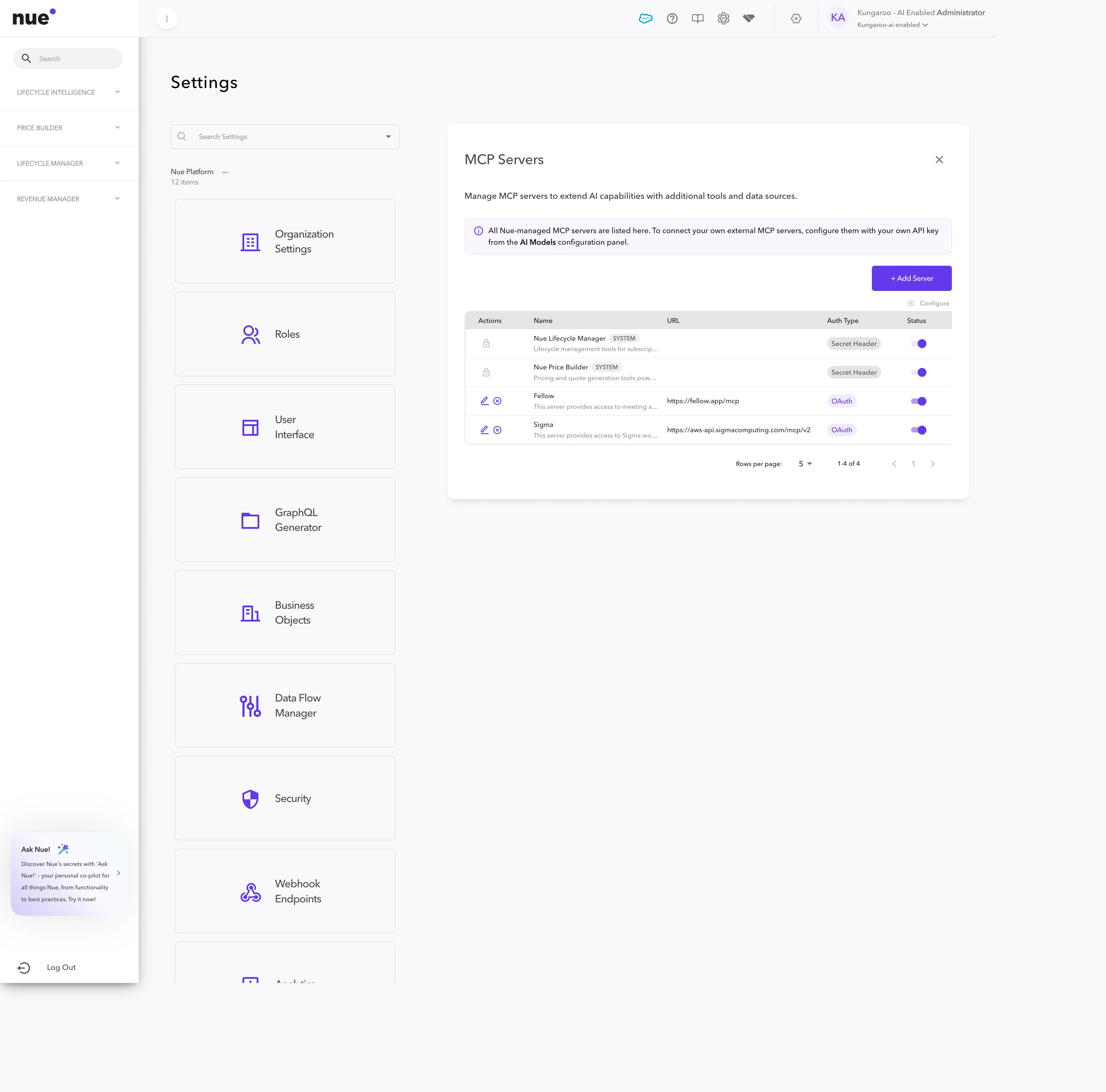
1. Open the MCP Servers list
Go to Settings → Nue AI → MCP Servers. System servers are listed at the top and can never be turned off. Click + Add Server.
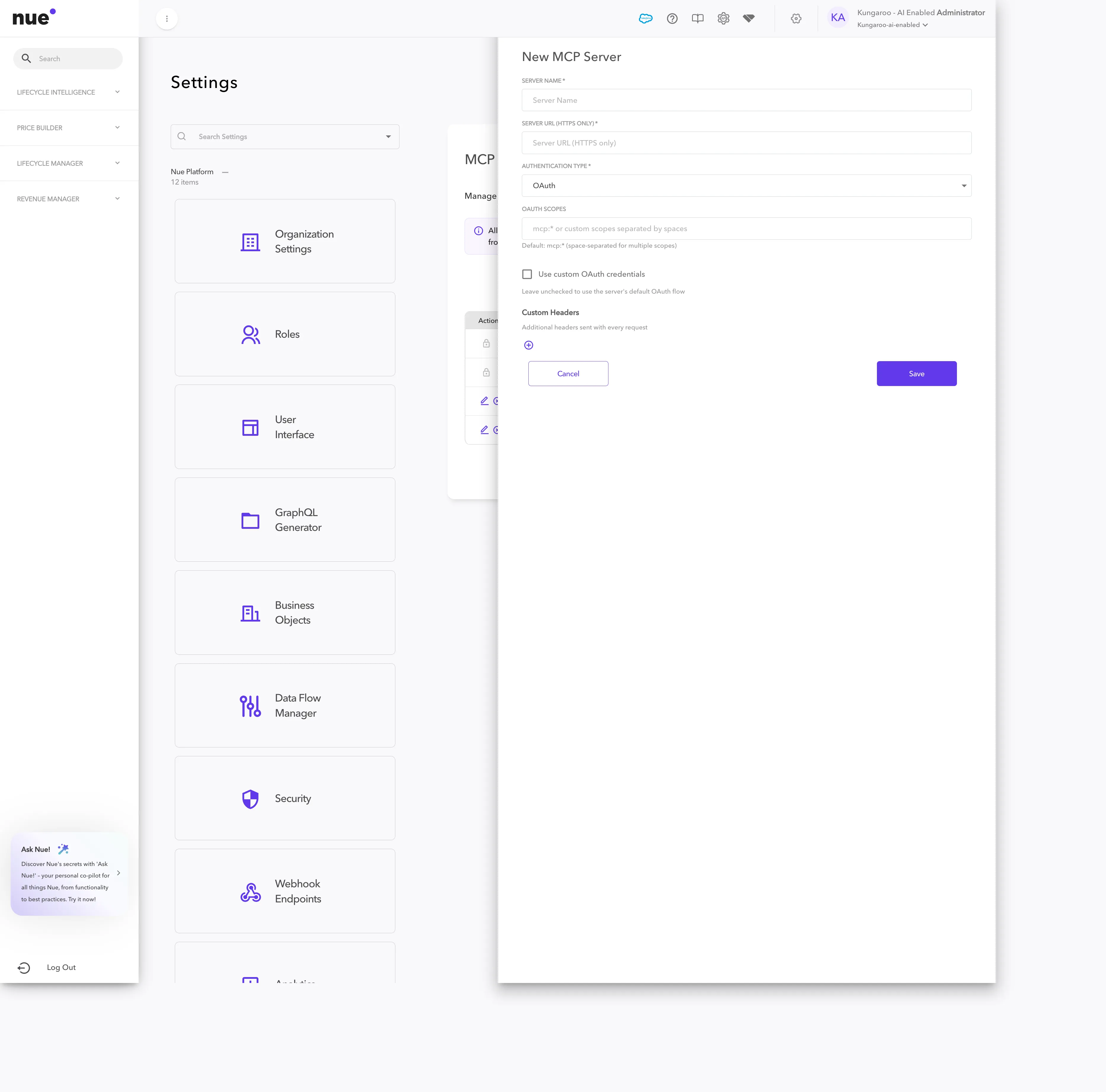
2. Add the server's basics
Fill in:
- Server Name — the display name reps will see (e.g. Sigma)
- Server URL (HTTPS only) — the MCP endpoint (e.g. https://aws-api.sigmacomputing.com/mcp/v2)
3. Choose authentication
Pick one of the three types from the Authentication Type dropdown:
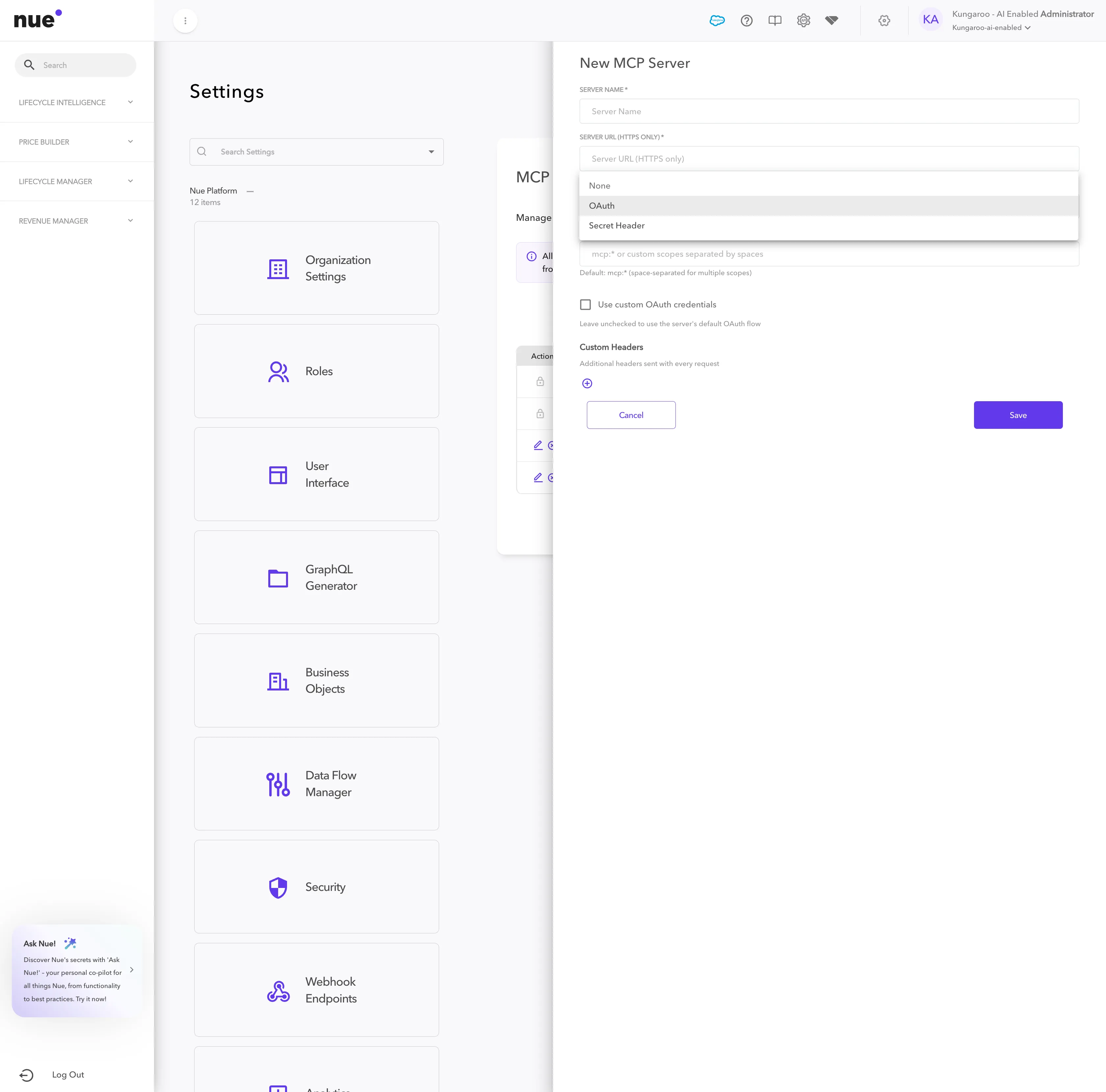
Type | When to use it | What you provide |
|---|---|---|
None | Public MCP servers with no authentication | Nothing — Server Name and URL only |
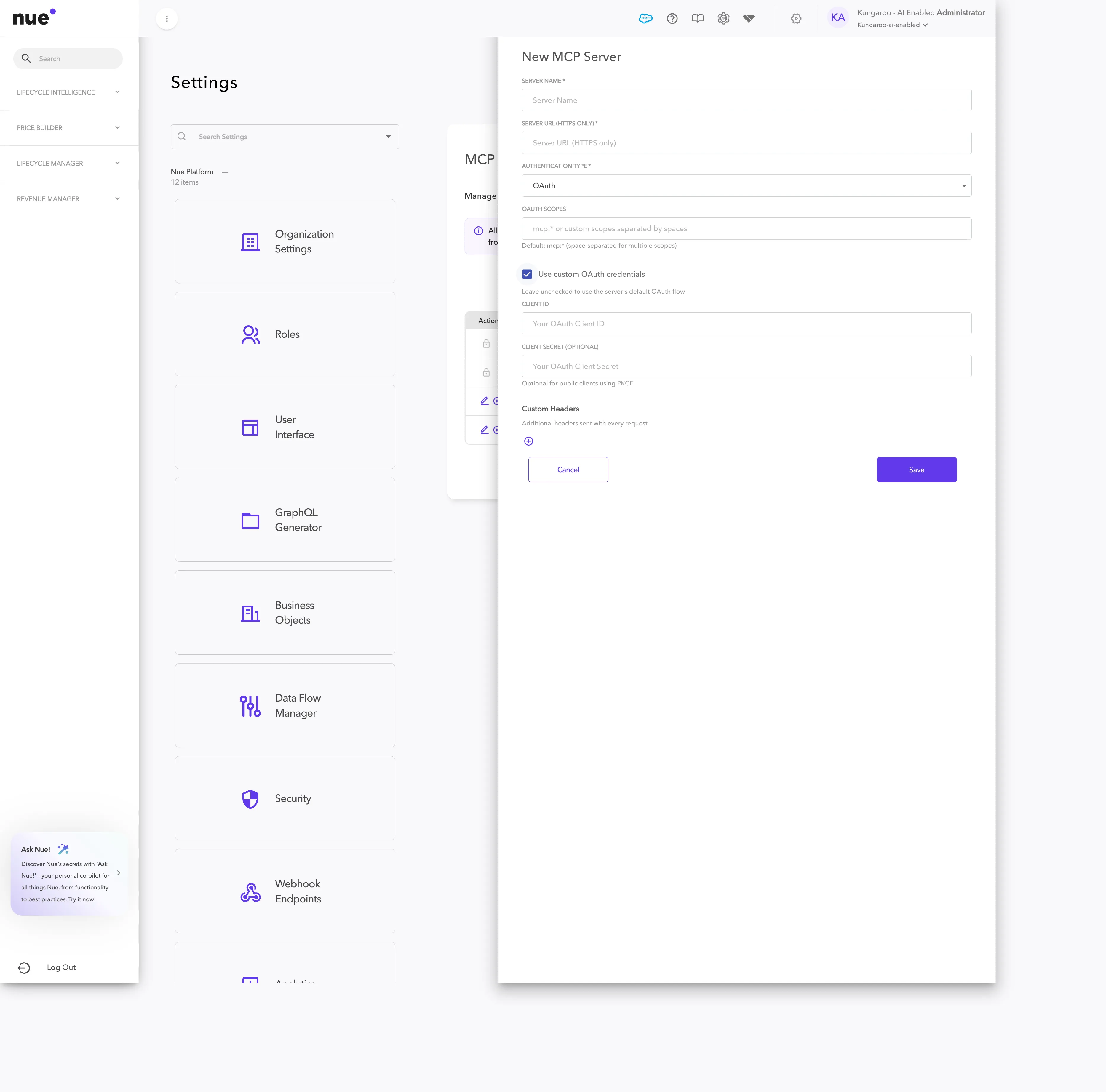
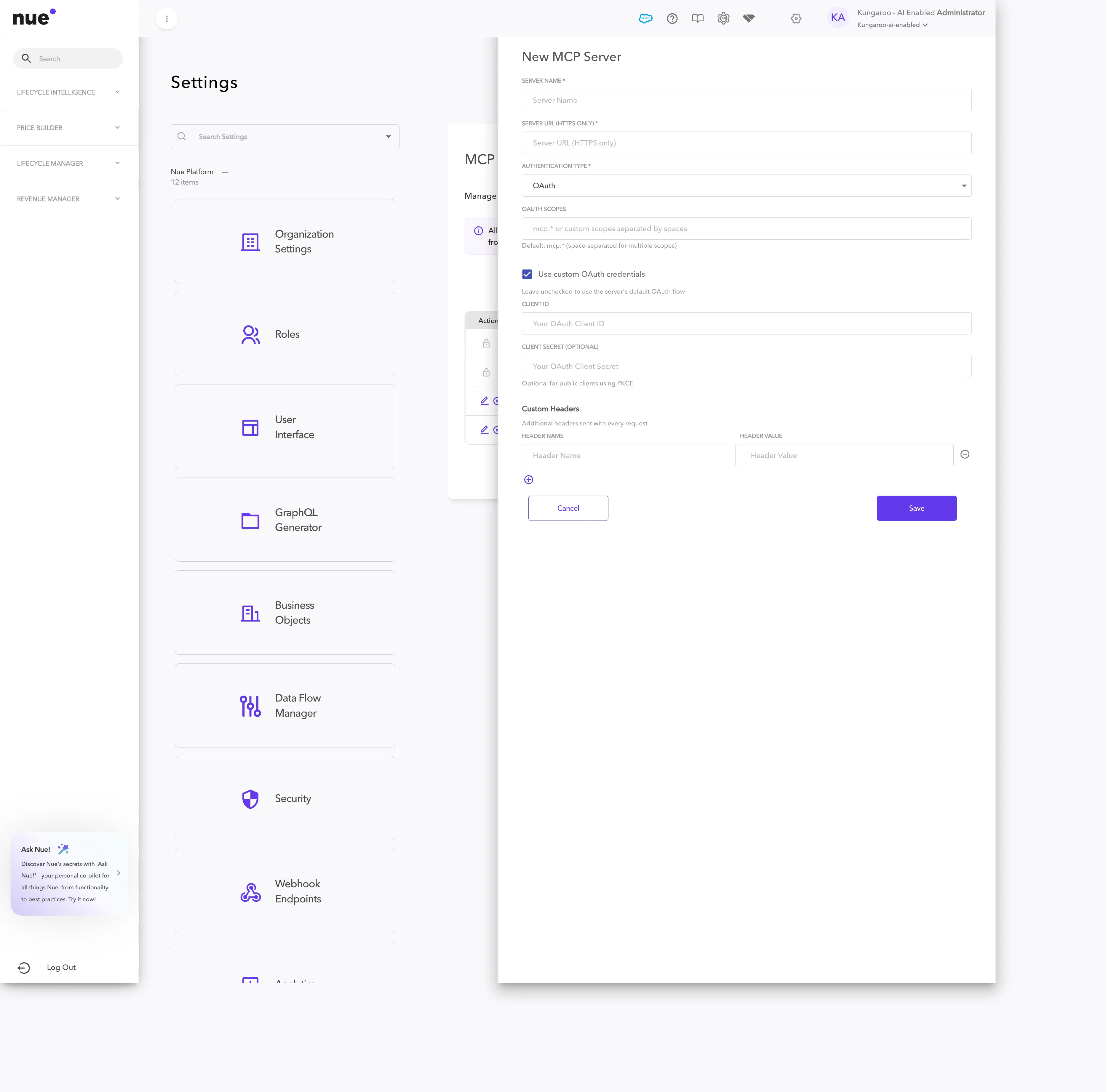
OAuth (default) | Most modern SaaS MCP servers | OAuth scopes (defaults to mcp:*). Optionally check Use custom OAuth credentials if the server requires your own OAuth client — then provide Client ID + optional Client Secret |
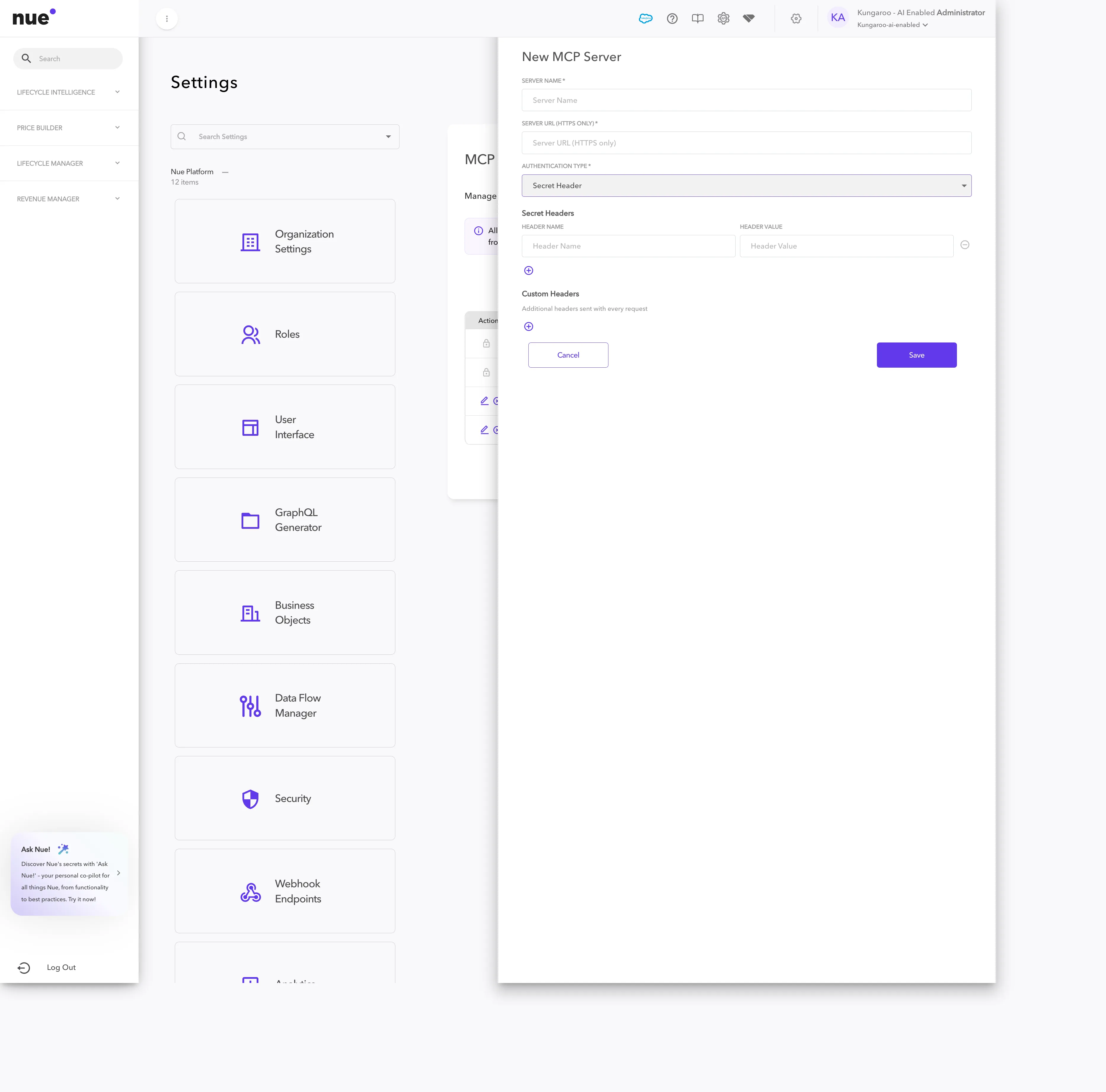
Secret Header | Servers that authenticate via a static header or API token | One or more Header Name + Header Value pairs |
OAuth with custom credentials — for servers that require your own registered OAuth client:
Secret Header — for servers that authenticate via a token in an HTTP header:
4. Add custom headers (optional)
Expand Custom Headers if your server expects additional headers on every request (e.g. a tenant ID or API version). Each row is a Header Name + Header Value pair; use the + button to add more.
5. Save
Click Save. The server appears in the MCP Servers list. For OAuth servers, the first time a sales rep uses a tool from the new server, they'll be prompted to Re-authenticate to complete the OAuth flow in their browser.
For Admins — Manage external MCP servers
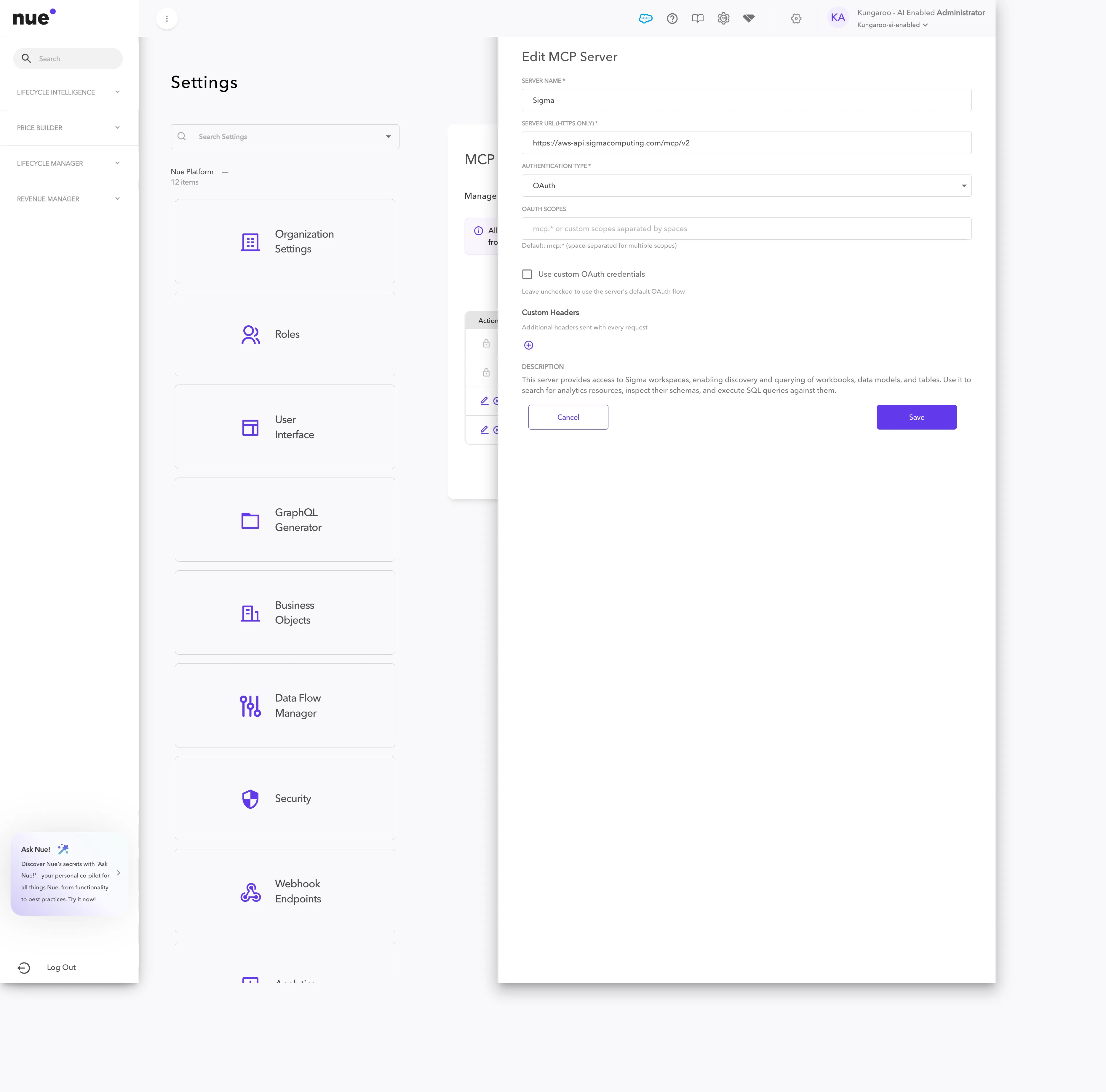
Each external server has the following actions in the list:
Action | When to use it |
|---|---|
Edit | Change name, URL, scopes, auth, or custom headers. The server's Description is pulled from its MCP manifest and updates on reconnect — you can override it from the Edit form |
Delete | Permanently removes the server from your tenant. Reps lose access immediately |
Toggle off | Disable without deleting — the server stays in the list but the agent stops seeing its tools |
System servers (Nue Lifecycle Manager, Nue Price Builder) cannot be edited, deleted, or disabled. They're always on.
For Sales Reps — Using external MCPs
Where to find the panel
Open the AI Guided Quote dialog on any Salesforce account, then expand MCP Servers (N) at the bottom-right of the side rail. Each line shows the server name, a status badge, and the actions you can take.
Status badges and actions
Status | What it means | Actions available |
|---|---|---|
Connected | The agent can call this server's tools | Reconnect · Re-authenticate · Disconnect |
Needs auth | OAuth not yet completed for your session | Re-authenticate · Disconnect |
Failed | Connection error or token expired | Reconnect · Re-authenticate · Disconnect |
What happens when you disconnect
Disconnect is session-only. It removes the server from your current chat — it does not change your admin's tenant configuration. The server is still available the next time you open AI Guided Quote. To remove a server permanently, ask your admin to delete it from Settings.
Nue Lifecycle Manager is always on. The system server that powers customer, subscription, opportunity, and renewal lookups cannot be disconnected from the rep panel.
Where external MCPs work
Once an admin has connected and enabled an external MCP server, its tools become available everywhere Nue's agent runs:
- AI Guided Quote — the in-Salesforce assistant on the Account record. External MCPs appear in the bottom-right MCP Servers panel and are usable for every guided playbook conversation.
- Nue Lifecycle Manager MCP from your own client — when you connect Nue Lifecycle Manager as an MCP server from an external client (e.g. Claude Desktop, an IDE, or a custom agent), the external MCP servers you've configured in Nue are routed through the same connection, so the agent in that client can use them too.
The same tenant configuration powers both — connect once, use everywhere.
How agents decide when to use an external tool
The agent picks tools based on what you ask and what the active Guided Selling Playbook tells it to do. A renewal conversation that needs ARR by customer will reach into a connected Sigma server; a quote prep that wants recent meeting notes will reach into Fellow or Gong. You don't have to name the tool — describe what you need.
- The agent only sees tools from active, connected servers in your session.
- If an external tool returns an error or times out, the agent reports it in the conversation and continues with what it can do without that tool — the chat doesn't break.
- Tool availability respects the auth, scopes, and permissions your admin set on each server.
For playbook-level control over which tools the agent uses in which deal motion, see AI Guided Selling.
Tips and limits
- HTTPS only. Server URLs that don't start with https:// are rejected.
- OAuth scopes default to mcp:* — broad access. If your server supports tighter scopes, list them space-separated in the OAuth Scopes field.
- Disconnect is per session. A rep disconnecting from the panel does not change the tenant configuration; the server returns next time they open AI Guided Quote.
- System servers never need re-authentication. Nue Lifecycle Manager and Nue Price Builder use Nue-managed credentials.
- Edit reflects the live manifest. When you edit a server, the description and tool list pulled from the server's MCP manifest refresh on save.
FAQ
Can I use external MCPs on Nue's default AI provider? No. External MCP support requires you to set your own AI provider in Settings → Nue AI → AI Model. While the default Nue-managed provider is selected, the + Add Server action is not shown.
Do I need to write any code? No. If the third-party tool exposes a public MCP endpoint, you only need its URL and your auth credentials. Building your own MCP server is a separate topic — see the MCP specification at modelcontextprotocol.io if you want to expose your own.
What authentication methods are supported? None, OAuth (with or without your own client credentials), and Secret Header (one or more name/value pairs).
Where do I find the URL for Sigma, Gong, or Fellow? Each vendor publishes their MCP endpoint URL in their own MCP docs. Examples in this guide: Sigma at https://aws-api.sigmacomputing.com/mcp/v2, Fellow at https://fellow.app/mcp.
Can different sales teams see different MCPs? Yes — your Guided Selling Playbooks control which tools the agent calls for each deal motion, segment, and role. See AI Guided Selling.
What if I delete an external MCP server while reps are using it? Reps lose access immediately. Any in-flight conversation that already returned data from the deleted server keeps that data in its transcript, but no further calls to the deleted server are made.