Nue MCP App Overview
The Nue MCP App is Nue's revenue platform running inside your AI client. You connect once, then quote, approve, generate documents, and send for signature in the same conversation — and instead of walking you through a wall of JSON, Nue renders its own interactive surfaces directly in the chat: a customer picker you click, a quote preview with real totals, an approval path you can read, a signature request you review before it goes out.
An MCP server gives a model tools. An MCP App adds the other half: the cards those tools render, so a person can see and act on the result rather than only read a summary of it.
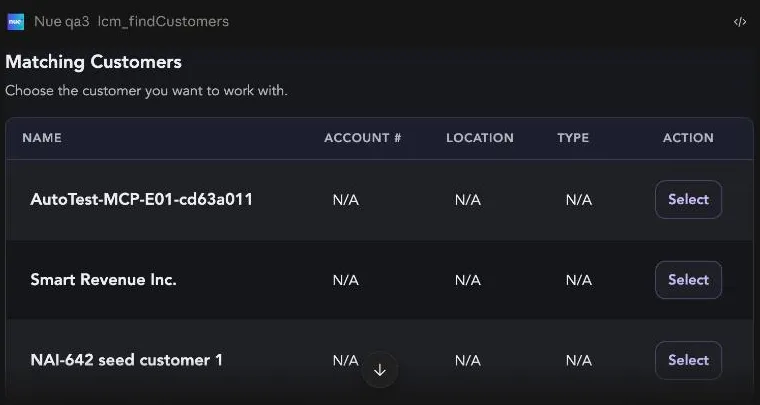
What makes it an app, not just a server
| Plain MCP server | Nue MCP App |
|---|---|---|
Tool result | JSON the model summarizes in prose | A rendered Nue card — tables, totals, badges, status |
Taking the next step | You type the next instruction | You click a button on the card |
Front end | None | Nue's own React components, served as ui:// resources |
Where it runs | Any MCP client | Any MCP client that supports MCP Apps (Claude today) |
The cards are declared by the tools themselves. When lcm_previewApprovalPath returns, it also tells the client which widget renders it — so a card built once shows up in every client that supports MCP Apps, with no per-client work and no second front end to maintain.
It runs on the Nue MCP Gateway
The MCP App is not a separate product with its own back end. It is a rendering layer over the Nue MCP Gateway — the same single endpoint, the same federated servers, the same tools you already reach from Claude Code or any other MCP client.
Claude  ──▶  Nue MCP Gateway  ──▶  Lifecycle Manager · Price Builder · Billing · Admin · Docs
   ▲              │
   └── ui:// cards┘   (declared by the tools themselves)
Two consequences worth internalizing:
- Nothing is duplicated. A tool that gains a card keeps working normally for clients that can't render one — they get the structured result instead of the widget.
- Everything the gateway governs, the app inherits — authentication, audit, and, most importantly, which tools exist at all.
Tool Visibility decides what the app can even offer
The gateway federates well over two hundred tools. Nobody should be handed all of them, so Nue scopes the set per user through Tool Visibility — and the MCP App is subject to it exactly like every other client.
Visibility is derived from the roles of the signed-in user. Every tool declares the API resources it needs, and it becomes visible to a role only when that role's existing API grants cover all of them. An administrator can additionally hide tools from a role, but overrides only ever subtract — there is no way to force a tool visible for a role that lacks the underlying permission.
What you hold | What the app does |
|---|---|
The role has the permissions, tool not hidden | The tool is callable and its card renders |
The role has the permissions, admin hid the tool | The app behaves as though the tool does not exist |
The role lacks a required API permission | Same — and it cannot be toggled on until the permission is granted on the Roles page |
In practice this means the app looks different to different people, by design. A Sales Representative gets the quoting motion in this documentation. A Finance Operations Manager gets billing. An E-Signature User gets little more than lookups and the signature flow. None of them had to configure anything — the tool set falls out of the role.
Tool Visibility is a discovery control, not a security boundary. Hiding a tool removes it from what the assistant can find and call. It does not change what the underlying APIs allow — every call the gateway dispatches is still authorized by the Nue API against the caller's own permissions. Treat it as scoping the surface, not as the thing standing between a user and data they shouldn't have.
What you can do
The app covers the deal motion end to end. Every step below is a real card with real buttons:
Step | What the card shows | Tool behind it |
|---|---|---|
Find the customer | Matching accounts, each with a Select button | lcm_findCustomers |
Create the opportunity | Name, close date, stage | lcm_createOpportunity |
Preview the quote | Line items, dates, list total, All Set, Create Quote | lcm_createNewQuote (commit: false) |
Commit the quote | Quote summary plus an Edit Line Items deep link into Nue | lcm_createNewQuote (commit: true) |
Preview approvals | Every path evaluated, which will trigger, and why | lcm_previewApprovalPath |
Submit for approval | Routing state and whether the quote is locked | lcm_submitForApproval |
Track and decide | Progress, assigned approvers, skipped steps | lcm_getApprovalStatus, lcm_approveApprovalRequest |
Generate the document | Preview PDF, Download PDF, Attach to Salesforce | lcm_getQuoteTemplates, lcm_generateQuoteDocument |
Send for e-signature | Recipients, email subject and body, Confirm & Send | lcm_previewQuoteESignature |
See Creating a Quote in the Nue MCP App for the full worked example.
How the app keeps you safe
Three independent guardrails sit between a conversation and a committed record. They are the reason the app can be trusted with real revenue operations.
1. The client asks before any tool runs
Your AI client shows you the tool name, the server it belongs to, and the exact request payload before it executes. Nothing reaches Nue until you allow it.
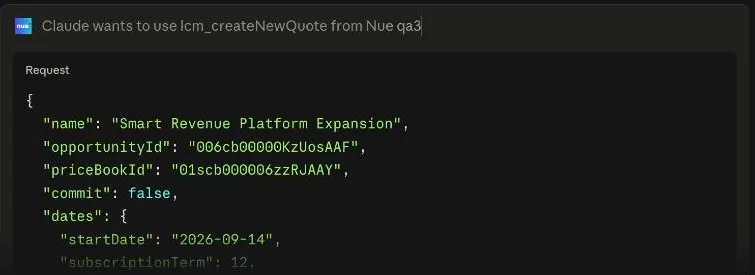
Read the payload, not just the tool name. On the quote tool, "commit": false is a preview and "commit": true is the real write.
2. Preview always comes before commit
Quotes, approvals, and signature requests each have a read-only preview that writes nothing. You see the numbers, the approval path, or the recipient list first, and only then decide. The preview card is what carries the button that moves you forward.
3. Card buttons draft a message — they don't fire
Clicking a card CTA doesn't silently call a tool. It writes the instruction into your message box and leaves it there, so you read it and press send yourself.
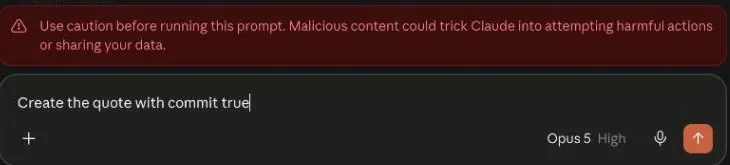
Your client may also warn you to check a drafted prompt before running it. That warning is generic to any content a page can put in your composer — read the drafted text, confirm it matches what you meant, then send.
Your permissions still apply. The app acts as you. It can only see and change what your Nue role and Salesforce sharing already allow — connecting an AI client never widens your access.
Where it runs
Client | Cards render | Notes |
|---|---|---|
Claude (web, desktop) | ✅ Yes | The supported MCP App client today |
ChatGPT | 🚧 Under testing | Connects as an MCP server and the tools work, but Nue's cards don't render yet. Support is in testing and will be available soon. |
Claude Code, Codex, Cursor | ➖ Tools only | Full tool access; results come back as structured data rather than cards |
Start at Connecting Claude to the Nue MCP App.
Related
- Connecting Claude to the Nue MCP App — set up the connector and confirm cards are rendering.
- Creating a Quote in the Nue MCP App — the full quote → approval → document → signature walkthrough.
- Building a Skill for the Nue MCP App — package a repeatable motion so one sentence runs it.
- Nue MCP Servers Overview — the gateway and the servers the app is built on.
- Connecting to Nue MCP — the OAuth sign-in model in depth.